Operations Guide
11 Signs Your Pool Service Business Has Outgrown Spreadsheets
Spreadsheets, calendars, and paper route sheets can work well at first. The question is whether they still support the way your pool service business operates today.
When Has a Pool Company Outgrown Spreadsheets?
Not every pool company needs software from day one. Many successful businesses start with a calendar, spreadsheets, and accounting software.
The need for software usually is not driven by customer count. It is driven by growing operational complexity.
If scheduling, routing, service records, invoicing, and customer information are becoming harder to manage across disconnected tools, spreadsheets may no longer be enough.
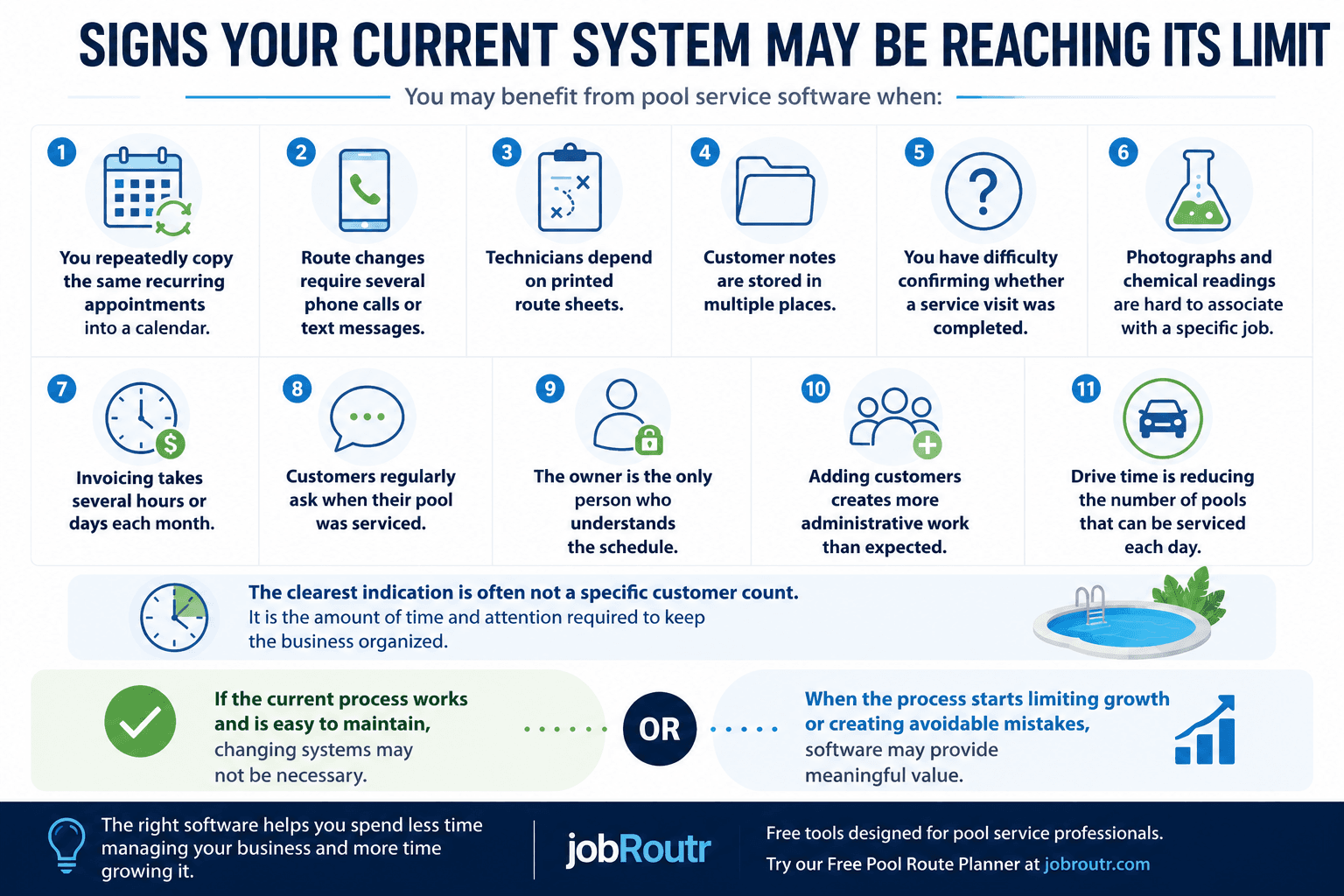
11 Signs You Have Outgrown Spreadsheets
Why Spreadsheets Work Until They Don't
Spreadsheets are useful because they are flexible, familiar, and inexpensive. For a small route, one owner can usually keep customer names, service days, notes, and billing reminders organized well enough.
The problems start when the spreadsheet becomes the place where every exception, route change, gate code, chemical note, invoice status, and customer request has to be manually updated. At that point, the work is not just data entry. It is coordination across the office, technicians, customers, and accounting.
If routing is the first part of the process breaking down, try the Free Pool Route Planner before changing your whole system. You can also browse our free tools for pool service businesses as new planners, calculators, and templates are added.
The 11 Signs
1. You Re-Enter Recurring Appointments
Pool service is recurring work. If the same weekly or biweekly appointments have to be copied by hand, your calendar is creating extra administration instead of reducing it. Software can keep recurring service tied to the customer, location, technician, and route so each visit does not have to be rebuilt manually.
2. Route Planning Takes Too Long
A spreadsheet can list stops, but it does not make route decisions easy. As the customer list grows, route planning can become a weekly puzzle involving addresses, technician availability, drive time, gate access, and customer preferences. This is often one of the first places software can save meaningful time.
3. Customer Information Lives in Too Many Places
Customer details may start in a phone contact, notes app, spreadsheet, text thread, accounting system, and printed route sheet. That can work for a small owner-operated business, but it becomes fragile when another person needs the same information. A single customer record reduces the chance that instructions, billing details, or service history are missed.
4. Technicians Depend on Printed Route Sheets
Printed route sheets are simple, but they are hard to update once the day changes. If a stop is added, skipped, reassigned, or rescheduled, the office often has to call or text the technician. Mobile route access gives field staff a current view of assigned work and gives the office better visibility into job progress.
5. Completed Service Is Hard to Verify
When service completion is tracked on paper or from memory, the office may not know whether a job was completed until the route sheet comes back. This makes it harder to answer customer questions, catch missed stops, and invoice accurately. Software should make completion status visible without chasing updates.
6. Photos, Notes, and Chemical Readings Are Disconnected
Photos in a phone camera roll, notes in a text thread, and readings on paper are difficult to connect back to a specific customer visit. Over time, that weakens service history. A good field workflow keeps photos, readings, notes, and completed work attached to the right service location.
7. Invoicing Takes Hours or Days
Slow invoicing is a clear operational warning sign. If the owner has to collect route sheets, confirm completed visits, enter line items, and reconcile information across several tools, billing becomes a bottleneck. Software can help turn completed work into invoices more consistently.
8. Customers Ask Questions You Cannot Answer Quickly
Customers may ask when their pool was serviced, what was done, whether a photo was taken, or when an invoice was sent. If answering requires calling a technician or searching through several systems, the business has outgrown its information process even if the customer count still feels manageable.
9. The Owner Is the Only Person Who Understands the System
Many small pool businesses run on the owner's memory. That can be efficient at first, but it creates a growth ceiling. When every route change, customer detail, billing exception, or special instruction depends on one person, adding technicians or office help becomes harder than it should be.
10. Adding Customers Creates More Admin Than Revenue
New customers should increase revenue, but they also add scheduling, routing, service records, invoices, and customer communication. If each new account creates disproportionate office work, the business may need a more structured operating system before it can grow comfortably.
11. Drive Time Is Limiting Daily Capacity
Poor route structure can quietly reduce the number of pools a technician can service each day. If technicians spend too much time crossing town, route planning is no longer just an organization problem. It affects capacity, fuel cost, labor efficiency, and customer growth.
What to Do Next
If only one or two signs apply, you may not need to change systems immediately. Start by improving the weakest part of your current process.
If several signs apply, document where work is being repeated, delayed, or lost. Then compare software based on those specific operational problems rather than choosing the platform with the longest feature list. For route-specific issues, the Free Pool Route Planner can help you test whether better stop order would reduce drive time before you evaluate a full platform.
For a broader comparison of scheduling, routing, field-service records, invoicing, payments, and pricing, read our Best Pool Service Software for Small Businesses guide.
Ready to Replace Spreadsheet Chaos?
Start with a quick route check, or see how JobRoutr helps pool service companies manage customers, recurring service, routes, field work, invoices, and payments.
Frequently Asked Questions
How many customers should a pool company have before using software?
There is no fixed customer count. Some companies can stay organized with spreadsheets for a long time, while others need software earlier because of route complexity, technicians, invoicing volume, or service documentation requirements.
Can spreadsheets still work for a pool service business?
Yes. Spreadsheets can work well for small, simple operations. They usually become harder to manage when information must be shared across technicians, routes, service records, invoices, and customer communication.
What should a pool company replace first?
Start with the process causing the most repeated work or mistakes. For many pool service companies, that is recurring scheduling, route planning, field-service completion, or invoicing.
Related resources
Best Pool Service Software for Small Businesses
Learn which features matter most, how to compare platforms, and how to choose software that fits the size and workflow of your pool service company.
Read guidePool Service Business Resources
Browse practical guides about software, scheduling, routing, invoicing, and running a more efficient pool service business.
Read guide