Software Guide
Best Pool Service Software for Small Businesses
Running a pool service business becomes more complicated with every new customer, route, technician, invoice, and piece of equipment you need to track.
A small company may be able to operate with a calendar, spreadsheet, paper route sheets, text messages, and accounting software. That system can work surprisingly well for a while. The problems usually begin when information becomes scattered, schedules change, routes overlap, invoices fall behind, or the owner becomes the only person who understands how everything fits together.
Pool service software brings those activities into one system. The right platform can help a business organize recurring service, build routes, record work completed in the field, create invoices, collect payments, and keep customer information accessible.
There is no single platform that is best for every pool company. A one-person operation servicing 40 pools has different needs from a company with several technicians and hundreds of weekly stops.
This guide explains what to compare so you can choose software that fits your company rather than paying for complexity you do not need.
What Is Pool Service Software?
Pool service software is a business-management platform designed around the recurring work performed by pool maintenance and service companies.
Unlike a general calendar or invoicing application, pool software can connect several parts of the operation:
- Customers and service locations
- Recurring pool-service visits
- Technician schedules
- Daily and weekly routes
- Service notes and photographs
- Chemical readings
- Pool equipment and assets
- Products and services
- Invoices
- Payments
- Business reporting
The main benefit is not simply having more technology. It is reducing the number of separate places where the business keeps important information.
When customer details are stored in one application, routes in another, service notes on paper, and invoices in an accounting system, the owner often has to manually connect everything. Good software reduces that administrative work.
When Does a Pool Company Need Software?
Not every pool company needs software from day one. Many successful businesses start with a calendar, spreadsheets, and accounting software.
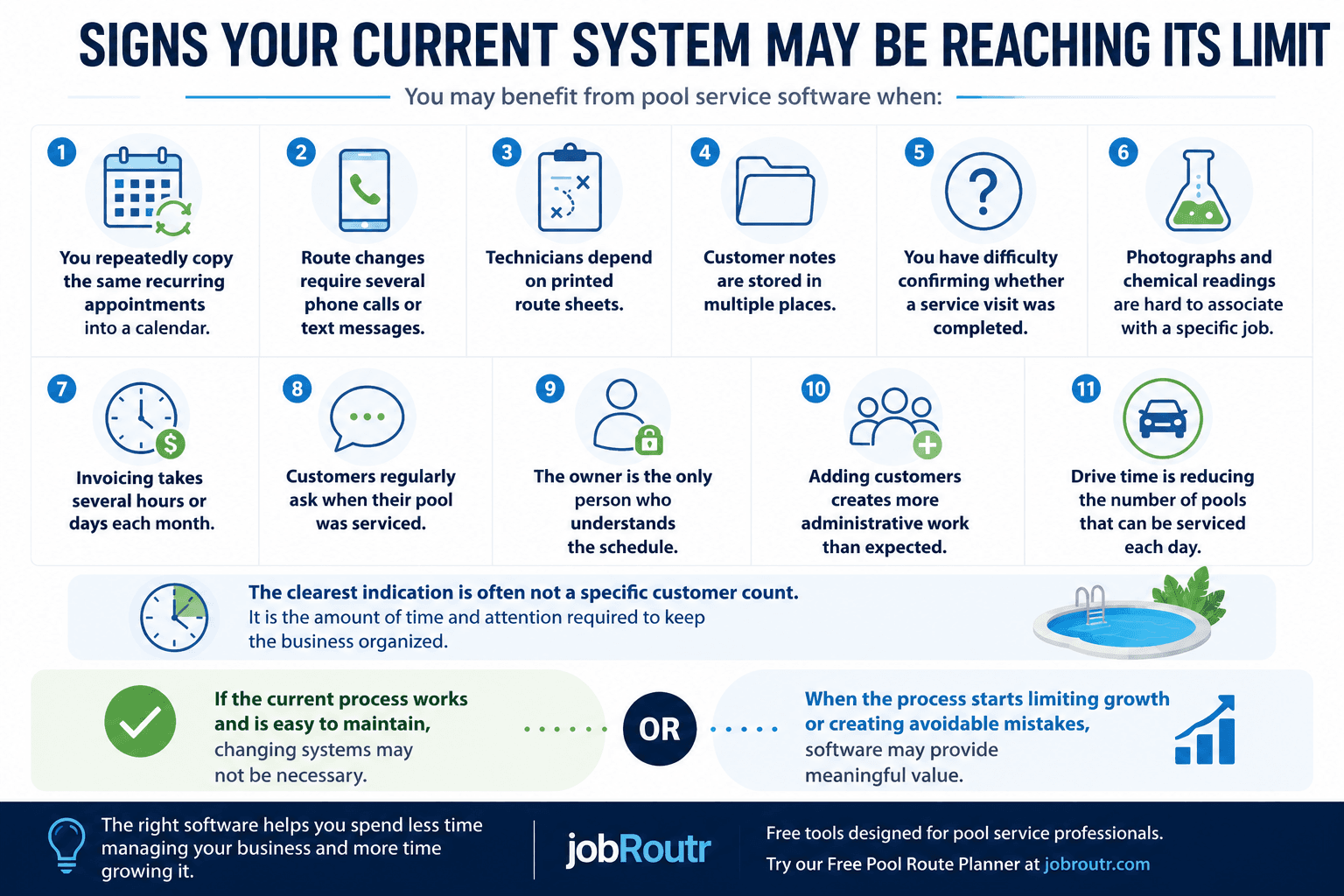
The need for software usually isn't driven by customer count. It is driven by growing operational complexity.
Common signs include:
- Re-entering recurring appointments
- Spending too much time planning routes
- Customer information scattered across multiple places
- Printed route sheets for technicians
- Slow invoicing
- Growing administrative work
- Difficulty tracking completed service
If several of these sound familiar, it may be time to consider software.
→ Read our complete guide: 11 Signs Your Pool Service Business Has Outgrown Spreadsheets
The Most Important Features to Compare
Software companies often present long feature lists. A small pool company usually does not need every possible capability.
The better question is: Which features remove work from the way my company operates today?
The following categories are the most important to evaluate.
1. Recurring Service Scheduling
Most pool businesses perform work on a repeating schedule. The software should make recurring service easy to create and maintain. A calendar may show appointments, but pool service software should understand that those appointments belong to an ongoing service relationship.
- Create repeating service visits
- Assign work to a technician
- Change a single occurrence without changing the full schedule
- Pause service temporarily
- Reschedule work due to weather, holidays, or customer requests
- View upcoming work by day, week, technician, or route
- Identify unassigned or missed jobs
2. Route Planning and Optimization
Route quality directly affects fuel use, technician time, and the number of pools a company can service in one day. A route tool should still allow the owner or dispatcher to make practical adjustments because the mathematically shortest route is not always the best operational route.
- Mapping customer locations
- Reordering service stops
- Grouping nearby customers
- Assigning stops to a technician
- Estimating route distance or travel time
- Comparing alternative route arrangements
- Handling temporary route exceptions
3. Mobile Access for Field Technicians
Technicians need access to job information while they are away from the office. The mobile workflow should be simple enough to use between stops. When evaluating software, ask to see the actual field workflow rather than only the owner dashboard.
- See the assigned work for the day
- Open customer and location details
- Review service instructions
- Record chemical readings
- Add notes
- Take photographs
- Mark work complete
- Record products or services used
- Continue working when connectivity is limited, when offline support is available
4. Customer and Location Management
A customer and a service location are not always the same thing. This structure becomes increasingly important as the business grows because it prevents employees from relying on memory or old messages for property details.
- Customer contact information
- Billing information
- One or more service locations
- Access instructions
- Service history
- Internal notes
- Pool equipment
- Recurring services
- Pricing arrangements
- Photos and documents, when supported
5. Equipment and Asset Tracking
A maintenance-focused business may not need a complex inventory-management system, but it should be able to preserve important equipment information with the service location.
- Pumps
- Filters
- Heaters
- Salt systems
- Automation systems
- Cleaners
- Lights
- Equipment model numbers
- Serial numbers
- Installation dates
- Service history
6. Service Records, Notes, Photos, and Readings
A completed job should produce a usable service record. These records can improve customer communication and help the office answer questions without contacting the technician.
- Arrival or completion time
- Technician
- Work performed
- Chemical readings
- Chemicals or products added
- General notes
- Internal notes
- Customer-facing notes
- Before-and-after photographs
- Recommended repairs
- Follow-up work
7. Invoicing
Invoicing is often one of the first administrative processes a growing service company wants to simplify. A platform does not necessarily need to replace the company's accounting system. It may instead create operational invoices and pass the necessary information into the accounting workflow.
- Can an invoice be created from completed work?
- Can recurring services be billed consistently?
- Can products and additional services be added?
- Can invoices be emailed?
- Can invoices be exported to accounting software?
- Can the business see unpaid balances?
- Are invoice numbers and tax settings configurable?
- Can staff correct mistakes without rebuilding the invoice?
8. Payment Collection
Integrated payments can shorten the time between sending an invoice and receiving payment. Payment pricing deserves careful attention, so estimate the total cost based on the number and value of payments your business processes.
- Card-payment support
- Bank-transfer or ACH support
- Transaction fees
- Platform fees
- Deposit timing
- Refund handling
- Failed-payment handling
- Saved payment methods
- Customer payment links
- Whether the company uses its own payment account
9. Accounting Integration
Before choosing a platform, determine which application should be the authoritative source for each type of information. A clear workflow matters more than the word integration on a feature list.
- Direct synchronization
- Customer imports
- Product and service imports
- Invoice exports
- Payment exports
- File-based exports
10. Reporting
Small companies do not necessarily need an advanced analytics platform, but owners should be able to answer basic operational questions. The best reports are the ones the owner will actually review and act upon.
- Jobs completed
- Jobs missed
- Work by technician
- Outstanding invoices
- Route activity
- Payment status
- Service history
A Practical Pool Service Software Checklist
Before choosing a platform, confirm whether it supports the items that matter to your business.
Scheduling
- Recurring service
- Easy rescheduling
- Technician assignment
- Missed-job visibility
- Schedule exceptions
Routing
- Mapped service locations
- Reorderable stops
- Route optimization or planning assistance
- Route assignment
- Mobile route access
Field Service
- Job instructions
- Notes
- Chemical readings
- Photos
- Products and services
- Completion status
- Reliable mobile experience
Customer Management
- Customer records
- Multiple service locations
- Billing details
- Access instructions
- Service history
Billing
- Invoice creation
- Email delivery
- Product and service line items
- Payment tracking
- Accounting workflow
- Refund handling, when needed
Business Fit
- Understandable pricing
- Easy onboarding
- Responsive support
- Data import and export
- Appropriate feature depth
- Room to grow
- No unnecessary operational complexity
The most important question is not whether a platform checks every box. It is whether it checks the boxes that matter to your business.
How to Evaluate Pool Service Software
A software demonstration can make almost any system look simple. The better evaluation is to test the platform against the way your company works on a normal day.
Step 1: Document Your Current Workflow
Identify where information is copied, delayed, forgotten, or dependent on one person. Those pain points should guide the software decision.
- A new customer inquiry
- Customer setup
- Service-location setup
- Recurring scheduling
- Route planning
- Technician assignments
- Field-service completion
- Extra products or repair work
- Invoicing
- Payment collection
- Accounting
- Customer questions
Step 2: Separate Essential Features From Optional Features
This prevents the company from choosing a more complicated platform because it has the longest feature list.
- Required: features the business needs before it can use the software, such as recurring scheduling, mobile technician access, service photos, invoicing, or accounting export.
- Valuable: features that would save time or improve service but are not mandatory, such as route optimization, integrated payments, equipment tracking, or customer notifications.
- Future: features that may matter as the company grows, such as multiple branches, advanced reporting, complex inventory management, sales commissions, or large call-center workflows.
Step 3: Test a Real Route
Do not evaluate the software using only sample data. A realistic trial reveals usability issues that are difficult to see in a sales presentation.
- Add service locations
- Create recurring work
- Build a route
- Assign a technician
- Open the route on a mobile device
- Record readings and notes
- Add a photograph
- Complete the jobs
- Create an invoice
- Export or record the invoice in the accounting system
Step 4: Include the People Who Will Use It
The owner, office staff, and technicians may have very different experiences with the same software. Adoption matters more than the number of available features.
- Is the next task obvious?
- Is important information easy to find?
- Does this replace work or create additional data entry?
- Can the mobile workflow be completed quickly?
- What happens when someone makes a mistake?
- Does the system require constant help from the owner?
Step 5: Calculate the Total Cost
Calculate the likely monthly cost at your current size and at the size you expect to reach over the next two or three years. Transparent pricing makes this easier.
- Monthly base fee
- Per-user fee
- Per-technician fee
- Per-customer or per-location fee
- Payment-processing fees
- Additional platform transaction fees
- Setup or onboarding fees
- Data-migration fees
- Accounting-integration fees
- Messaging charges
- Annual contracts
- Training time
- The cost of switching later
Step 6: Evaluate Support and Product Fit
A sophisticated enterprise platform may be a poor fit for a small company. A simple platform may become limiting for a large multi-location operator.
- How is support provided?
- What are the normal support hours?
- Is onboarding included?
- Can data be imported?
- Can company data be exported later?
- How frequently is the product updated?
- Does the software primarily serve pool-service companies?
- Does the company understand recurring route-based work?
- Is the platform designed for companies of your size?
Common Types of Pool Service Platforms
Pool service companies typically choose among four broad approaches.
Manual Systems
A manual system may include paper route sheets, wall calendars, text messages, spreadsheets, printed invoices, and notes stored on a phone. Manual systems may remain practical for a small and stable owner-operated business.
Advantages
- Low software cost
- Familiar
- Flexible
- No migration required
Limitations
- Information can become fragmented
- Difficult to share across employees
- More dependent on the owner
- Limited service history
- Repetitive invoicing and scheduling
- Harder to scale
General-Purpose Business Applications
Some companies combine calendars, spreadsheets, customer-management software, accounting software, and task-management applications. This approach can work when the owner is comfortable designing and maintaining the process.
Advantages
- Flexible
- Familiar applications
- Can be inexpensive
- Works across industries
Limitations
- Applications may not share data
- No pool-specific service workflow
- Recurring routes may require manual work
- Field records can be inconsistent
- Employees may need several applications
Full-Featured Pool Industry Platforms
These systems may make sense for companies that need broad capabilities and are prepared to invest in implementation.
Advantages
- Large feature set
- Built for pool businesses
- May support complex operations
- Often used by established companies
Limitations
- May cost more
- May require more setup
- Can include features a small company does not need
- Employees may face a larger learning curve
Simpler Pool Service Platforms
A simpler system can be a strong fit for a small or growing company that wants to replace paper and disconnected applications without adopting an enterprise-level platform.
Advantages
- Faster to learn
- Lower administrative burden
- May have more accessible pricing
- Easier for small teams to adopt
- Focuses on commonly used features
Limitations
- May not support every advanced scenario
- May have fewer integrations
- May be less suitable for very large organizations
How Much Should Pool Service Software Cost?
Pool software pricing varies widely because providers use different pricing models.
Common models include a fixed monthly subscription, pricing based on users, technicians, active customers, service locations, feature tiers, payment-processing fees, and additional platform fees on transactions.
The lowest monthly price is not automatically the least expensive option. Evaluate cost in relation to time saved and problems solved.
Software may justify its price when it reduces invoicing time, helps a technician complete more stops, prevents missed work, improves payment collection, reduces owner involvement, replaces several separate applications, or makes it easier to add customers or employees.
At the same time, a company should not pay for complexity simply because a platform is popular. The right price is one the business can understand, predict, and justify through operational value.
Choosing the Right Software for Your Business
The best software depends on how the company works.
A solo pool professional
- Simple recurring scheduling
- Customer and location records
- Mobile service notes
- Photos and readings
- Invoicing
- Affordable pricing
- Minimal setup
Advanced workforce-management capabilities may not be necessary.
A small company with several technicians
- Technician assignments
- Shared routes
- Mobile job completion
- Internal instructions
- Service verification
- Route efficiency
- Office visibility
- Consistent invoicing
Ease of adoption becomes especially important because the owner is no longer completing every visit.
A growing multi-route operation
- Route planning across technicians
- Permission controls
- Standardized service processes
- Reporting
- Accounting integration
- Payment collection
- Equipment history
- Scalable pricing
The business should also consider whether it is likely to add locations, service types, office staff, or specialized technicians.
A large or operationally complex company
- Advanced reporting
- Multiple departments
- Complex inventory
- Sales workflows
- Dispatching
- Multi-branch support
- Custom integrations
- Detailed user permissions
A simpler platform may not provide enough control for this type of operation.
Why Small Pool Businesses May Consider JobRoutr
JobRoutr is pool service software designed to help small and growing pool companies manage their day-to-day operations without unnecessary complexity.
JobRoutr brings together:
- Customers
- Service locations
- Pool equipment and assets
- Recurring services
- Products
- Route building and optimization
- Schedule exceptions
- Field-service jobs
- Photos
- Chemical readings
- Notes
- Invoice creation
- Payment collection
- QuickBooks Online workflows
- Owner reporting
The mobile application is designed for technicians working in the field, including support for completing work when connectivity is limited.
JobRoutr is intended for companies that want a structured operational system but may not need the cost or complexity of a larger platform. You can review current plan details on the pricing page and explore product capabilities in the features section.
See How JobRoutr Fits Your Pool Business
Explore scheduling, route planning, field-service records, invoicing, and payments in one platform built for pool service companies.
Frequently Asked Questions
What software do pool service companies use?
Pool service companies use a combination of industry-specific platforms, accounting applications, calendars, spreadsheets, routing tools, and manual systems. The right approach depends on company size, number of technicians, service volume, billing requirements, and the amount of operational complexity.
Do I need pool service software if I work alone?
Not necessarily. A solo operator with a manageable customer list may be comfortable using a calendar and accounting system. Software becomes more useful when recurring scheduling, route planning, service records, customer communication, and invoicing begin consuming too much time.
Can pool service software optimize routes?
Some platforms provide route-building or route-optimization capabilities. The level of automation varies. A good routing tool should help reduce unnecessary driving while allowing the business to adjust routes for practical concerns such as traffic, access windows, and technician preferences.
Can technicians use pool software from a phone?
Many platforms provide a mobile application or mobile-friendly interface. Before choosing software, test the actual technician workflow. Confirm that technicians can see assigned work, review instructions, record readings and notes, add photos, and complete jobs efficiently.
Does pool service software replace accounting software?
It depends on the platform and the company's needs. Many businesses use pool service software to manage operations and invoicing while continuing to use dedicated accounting software for bookkeeping and financial reporting. Review the available integration or export workflow before making a decision.
How much does pool service software cost?
Pricing varies by platform. Providers may charge a fixed subscription, per-user fee, per-technician fee, per-customer fee, per-location fee, transaction fee, or a combination of these. Compare the total expected cost at your present size and at the size you expect the company to reach.
What should a small pool company look for first?
Start with recurring scheduling, customer and location records, a practical mobile workflow, service documentation, invoicing, route management, and clear pricing. Additional features should solve a real operational problem rather than simply making the feature list longer.
How long does it take to switch pool service software?
The time required depends on the amount of customer data, recurring service information, pricing, equipment history, and accounting data that must be moved. A small business may be able to start with a limited customer group and gradually transition. Test the full workflow before migrating the entire operation.
Final Thoughts
The best pool service software is not necessarily the platform with the most features or the largest customer base.
It is the platform that fits the way your company operates, removes meaningful administrative work, is easy for technicians and office staff to use, and remains affordable as the company grows.
Start by identifying the problems in your current process. Then test potential platforms using real customers, routes, jobs, and invoices.
A pool company that is satisfied with a simple manual process may have no urgent reason to change. A company struggling with scheduling, routes, service documentation, invoicing, or coordination may benefit substantially from bringing those activities into one system.
Choose software because it solves a real operational problem, not because every other company appears to be using it.
Ready to Simplify Your Pool Service Operation?
See how JobRoutr can help you organize customers, recurring services, routes, field work, invoices, and payments.
Related resources
11 Signs Your Pool Service Business Has Outgrown Spreadsheets
Learn when spreadsheets, calendars, and paper route sheets may no longer be enough for scheduling, routing, service tracking, invoicing, and customer management.
Read guideWhy Pool Service Companies Use Pool Service Software
Learn why growing pool companies use software to reduce admin work, improve routing, track service history, invoice faster, and collect payments more efficiently.
Read guidePool Service Business Resources
Browse practical guides about software, scheduling, routing, invoicing, and running a more efficient pool service business.
Read guide